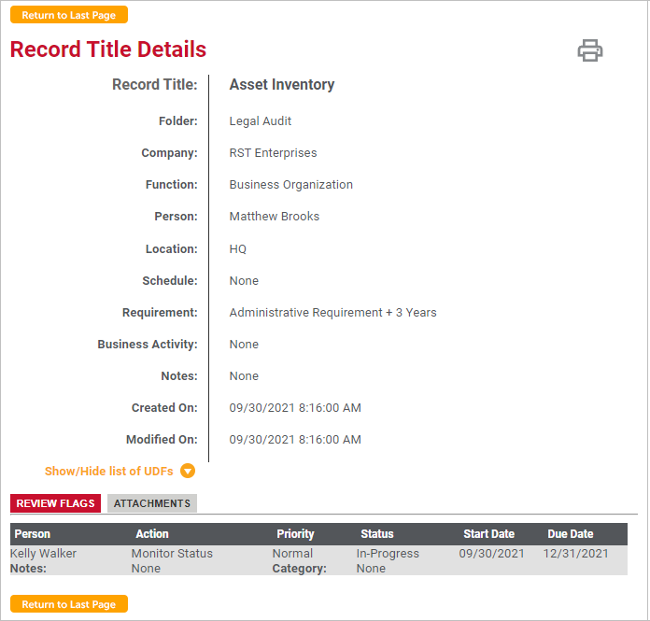
To view details about a record title, including the review flag details, you can click the title name. Details can be accessed on any screen that shows a record title including the main Interviews page, record title search results, and linked interviews on a schedule.
The following record title details are displayed:
· Record Title: Record title name.
· Folder: Interview folder in which the record title was saved.
· Company: Company under which the folder containing the record title was added, or - GLOBAL - for global record titles.
· Function: Business function associated with the record title, if applicable.
· Person: Name of the person interviewed, including their job title if assigned.
· Location: Location for which the record title is maintained. For example, the city, state, office, building, floor, etc.
· Schedule: Schedule title to which the record title is linked, if any.
· Requirement: Business requirement representing the interviewee’s opinion as to how long these records should be retained for operational or business purposes. The requirement is entered as a retention abbreviation plus years/months.
· Business Activity: Type of business or activity associated with the record title.
· Notes: Interview notes recorded about the record title.
· Created On: Date the record title was added.
· Modified On: Date the record title was last updated.
· Show/Hide list of UDFs: User-defined fields that were defined for Interviews in Versatile Retention. This control may not be visible depending on the configuration.
 ) in the
upper-left corner (see Printing
Interview Reports).
) in the
upper-left corner (see Printing
Interview Reports).
